
How to Install OpenSSH on Ubuntu Server?
To connect to a Linux server or any other remote system, the most common and secure method is to use SSH (Secure Shell). But in some Linux systems, SSH is not enabled, so to use an SSH connection, you need to install OpenSSH.
There are several ways of installing OpenSSH on Ubuntu, and in the following article, you will learn how to install it using the Ubuntu apt package manager, which is the easiest and best way.
Install OpenSSH on Ubuntu 24
When installing OpenSSH, you can generate SSH key pairs on Ubuntu in addition to using private and public keys to connect to your Ubuntu Server without any password.
To start the installation process, you need to connect to your server with root privileges, which, if you don’t have one, you can buy Ubuntu VPS with good configuration and on-demand support.
Update Ubuntu system packages
After connecting, the first step is to update your Ubuntu system packages list by running the commands below:
sudo apt update && apt upgrade -y
Install OpenSSH Server on Ubuntu
By running the command below, you can install the OpenSSH server on your Ubuntu server so it can accept incoming SSH connections.
sudo apt install openssh-server -y
Install OpenSSH Client on Ubuntu
Running this command on your device installs the OpenSSH client on your Ubuntu, which allows you to connect to other remote services with SSH as a client from your device:
sudo apt install openssh-client -y
Note: By using -y, you are telling that you automatically answer yes to prompts.
Check OpenSSH Status on Ubuntu
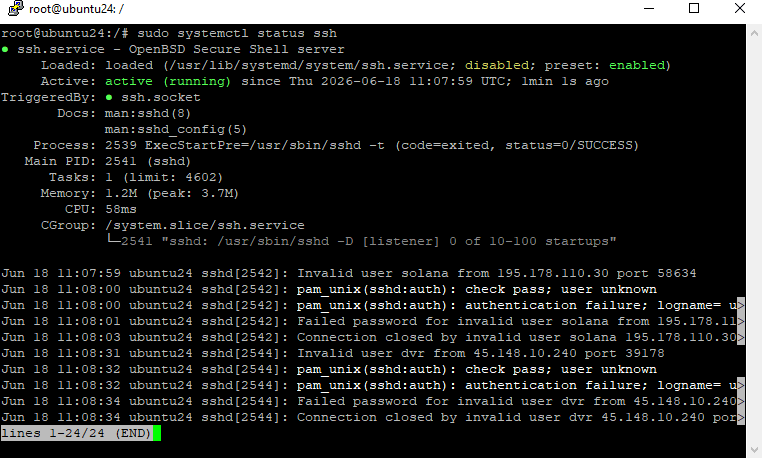
After installation, you need to check whether OpenSSH is running on your server or not. If not, you need to enable it manually. In most cases, it will automatically get enabled after installation, but it’s better to check by running this command:
sudo systemctl status ssh
Enable SSH Server on Ubuntu
After checking that the status of your SSH service was inactive, you can enable and activate it by running the command below:
sudo systemctl start ssh
Enable SSH on boot:
sudo systemctl enable ssh
Running this command, you can make the SSH service autostart on every boot.
Allow SSH Through Firewall Ubuntu
If you are using the UFW firewall in your Ubuntu server, the SSH port (tcp/22) might be blocked automatically. You need to open its port in your firewall to allow connections; otherwise, all connection requests will fail to establish.
Allow the SSH service from the firewall:
sudo ufw allow ssh
Check for firewall status:
sudo ufw status
Now you are all done installing and configuring OpenSSH on your Ubuntu server. Now you can make your SSH connections more secure using key authentication, etc.
OpenSSH Server VS OpenSSH Client
OpenSSH server is mostly used in Linux server which serving SSH protocol as a connection method, and OpenSSH client is used to connect to the server that runs the OpenSSH server.
They are both using the same system, but on different sides.
In the following table, you can see more details about the OpenSSH Server and OpenSSH client differences.
| Features | OpenSSH Client | OpenSSH Server |
|---|---|---|
| Role | Connecting out | Accepting incoming connection |
| Direction | Outgoing | incoming |
| Runing platform | Your Computer | Rremote PC / Server |
| Command | ssh | sshd |
| Use case | Access VPS, Github , Linux Server | Host SSH access |
Conclusion
Following the steps of this article, you will learn how to install the OpenSSH server and Client on the Ubuntu server. We’ve walked through installing and allowing its connections.
To use it practically, you will need to learn how to create SSH keys and how to connect to Linux with an SSH key.
FAQ
1 – Is OpenSSH installed by default on Ubuntu?
Yes, the OpenSSH client is installed on most of the Ubuntu desktops or servers, but you need to install the OpenSSH server manually on your system.
2 – Why Should You Install OpenSSH?
In most of the Linux servers, SSH is enabled by default, but in some of them, the SSH server is not installed by default, so it means you can not use the SSH protocol to connect to these servers. So you need to install OpenSSH on those servers to accept SSH connections.
3 – Is OpenSSH free to use?
Yes, OpenSSH is fully free and open source software, and it’s included in most Linux distributions like Ubuntu, Debian, CentOS, and Fedora.
4 – How to restart OpenSSH on Ubuntu?
Restart the SSH service using:
sudo systemctl restart ssh
Restarting can be useful when you are changing SSH configuration settings.
5 – How to uninstall OpenSSH on Ubuntu?
Be conscious that if you remove the SSH service from your server, you can be locked out, so don’t blindly remove OpenSSH from your server before uninstalling it. Make sure you have another connection port.
To remove the OpenSSH Server:
sudo apt remove openssh-server
To remove the SSH client:
sudo apt remove openssh-server

The Author Richard.M
Richard started out as a member of the support team and is now a full-stack web developer and support team lead at VPS Makers. He is passionate about providing people with top-notch technical solutions based on his 5 years of experience in web hosting, but as much as he enjoys coding and creating new works, he secretly dreams of becoming a sports star.
More from Richard.M